by Joshua Thomas
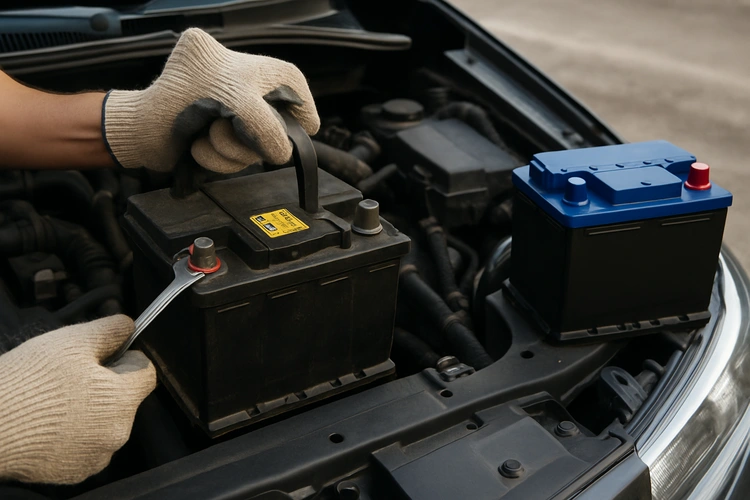
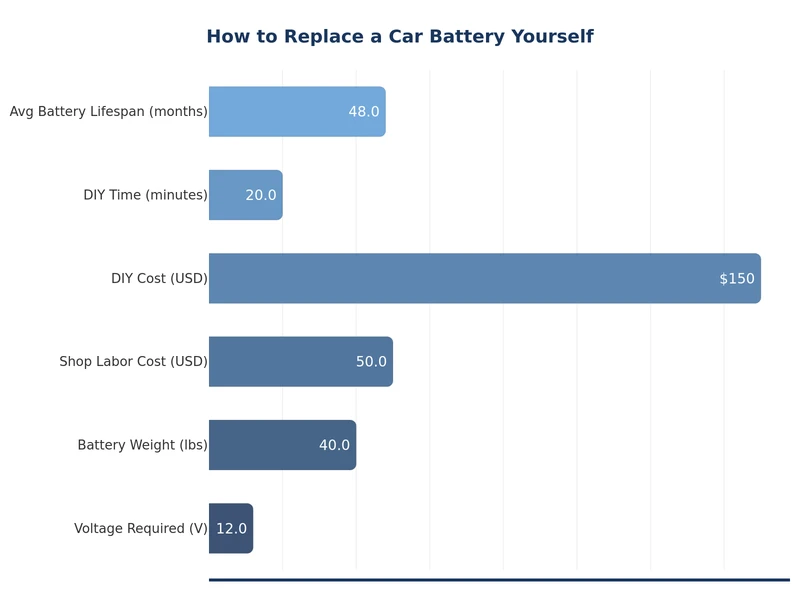
Knowing how to replace a car battery is one of the most practical skills any driver can have. A dead or failing battery is among the most common reasons cars won't start, and a replacement typically takes less than 30 minutes with basic tools. Whether your battery is old, swollen, or simply not holding a charge, doing it yourself saves money and gives you confidence under the hood — much like learning how to replace spark plugs yourself.
This guide walks you through the entire process: recognizing failure signs, choosing the right replacement, safely removing the old battery, and installing the new one correctly. No special mechanical experience required.
Contents
Your car usually gives clear signals before the battery fails completely. Watch for these indicators:
If your car needs a jump-start more than once in a short period, treat it as a definite replacement signal rather than a temporary fix.
Most lead-acid car batteries last three to five years under normal conditions. Heat accelerates degradation — in hot climates, expect closer to three years. Cold weather doesn't kill batteries as quickly, but it does expose weakness in an already-aging battery by increasing the power demand to crank a cold engine.
A battery older than four years should be tested annually at a parts store. Most auto parts retailers test batteries for free in minutes. According to the National Highway Traffic Safety Administration, vehicle electrical system failures — often battery-related — are a significant contributor to roadside breakdowns.
Every battery has a group size, cold cranking amps (CCA), and reserve capacity (RC). You must match the group size to your vehicle — it determines physical dimensions and terminal placement. CCA measures how well the battery starts a cold engine; always meet or exceed your manufacturer's minimum. Reserve capacity tells you how long the battery can power essentials if the alternator fails.
Find your vehicle's requirements in the owner's manual, on a sticker inside the engine bay, or by using the fitment guide at any auto parts store.
| Battery Type | Typical Lifespan | Best For | Relative Cost | Maintenance |
|---|---|---|---|---|
| Flooded Lead-Acid (FLA) | 3–5 years | Standard vehicles, budget replacement | Low | Occasional fluid check |
| AGM (Absorbent Glass Mat) | 4–7 years | Start-stop systems, high-demand vehicles | Medium–High | None |
| Enhanced Flooded Battery (EFB) | 3–5 years | Entry-level start-stop vehicles | Medium | None |
| Lithium-Ion (LiFePO4) | 8–12 years | Performance vehicles, weight savings | Very High | None |
If your vehicle has a start-stop system, it requires an AGM or EFB battery — installing a standard flooded battery will cause premature failure. Check our guide to how much car batteries cost for current pricing across all battery types.
Gather everything before you begin. Stopping mid-job to find a tool is frustrating and unnecessary.
A memory saver plugs into the OBD-II port or the 12V socket and maintains a low current to your vehicle's electronics while the battery is disconnected. This prevents loss of radio presets, window auto-up/down calibration, and idle relearn on some engines. It's a small investment that avoids annoying resets.
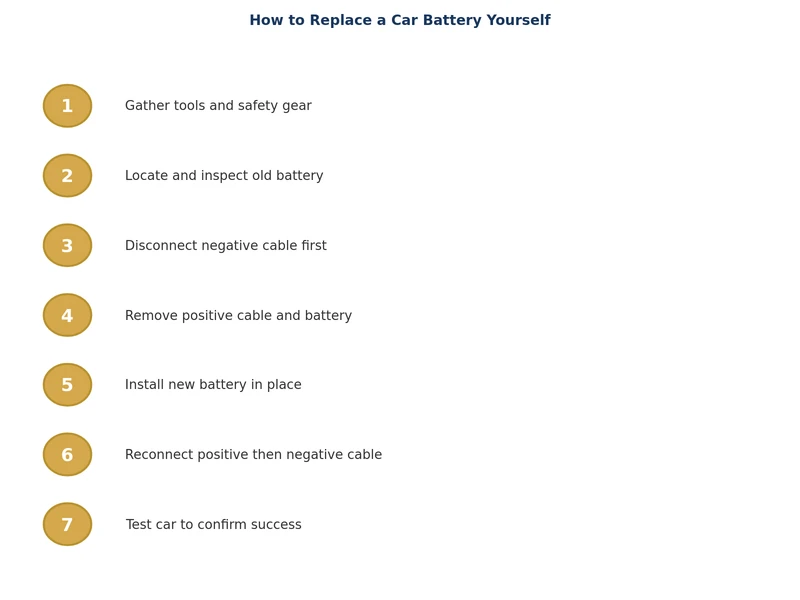
Just as thorough preparation matters when you inspect and replace brake pads, taking your time during battery installation prevents mistakes that could damage your vehicle's electronics.
After a successful battery swap, run through this checklist:
Keeping up with battery maintenance fits into a broader vehicle care routine. For a full overview of service intervals and tasks, see the complete car maintenance schedule checklist by mileage.
A replacement battery is only as long-lived as the care it receives. These habits make a real difference:
Check your owner's manual for the required group size, cold cranking amps (CCA), and battery type. You can also use the fitment lookup tool at any auto parts store — just enter your year, make, and model to get a list of compatible batteries.
Yes, with basic precautions. Always disconnect the negative terminal first and reconnect it last to avoid shorts. Wear safety glasses and gloves, work in a ventilated area, and keep open flames away from the battery since it can emit hydrogen gas.
Connecting positive before negative during removal — or negative before positive during installation — can create a short circuit if your wrench contacts the vehicle chassis. Always follow the correct sequence: disconnect negative first, connect positive first.
Possibly. Disconnecting the battery can reset radio presets, clock, window auto-calibration, and idle relearn parameters on some vehicles. Using an OBD-II memory saver during the swap prevents this. Resetting these items manually is straightforward if you choose not to use one.
Most battery replacements take 20 to 30 minutes for a first-timer. Once you've done it once, the process is closer to 15 minutes. Vehicles with batteries located in the trunk or under a seat take slightly longer due to access complexity.
Auto parts stores (such as AutoZone, O'Reilly, and Advance Auto Parts) accept used lead-acid batteries for free recycling. Many retailers also offer a core charge credit when you bring in an old battery with your new purchase. Never put a car battery in household trash or recycling bins.
 |
 |
 |
 |

About Joshua Thomas
Joshua Thomas just simply loves cars and willing to work on them whenever there's chance... sometimes for free.
He started CarCareTotal back in 2017 from the advices of total strangers who witnessed his amazing skills in car repairs here and there.
His goal with this creation is to help car owners better learn how to maintain and repair their cars; as such, the site would cover alot of areas: troubleshooting, product recommendations, tips & tricks.
Joshua received Bachelor of Science in Mechanical Engineering at San Diego State University.


Get some FREE car parts & gear.. Or check out the latest free automotive manuals and build guides here.
Disable your ad blocker to unlock all the hidden deals. Hit the button below 🚗
| | | |
