Car Care ›
by Joshua Thomas
Almost 70 percent of parents say in-car entertainment is the single biggest factor in keeping long road trips peaceful — yet most are still stuffing a tablet between the seat and the door. In 2026, purpose-built tablet holders for the car have become a genuine travel essential, and the market has exploded with options that range from simple silicone nets to aluminum-framed locking mounts with anti-theft keys. Choosing the wrong one means a rattling, drooping screen and frustrated passengers. Choosing the right one means hands-free viewing, a calmer backseat, and full attention on the road where it belongs.
The category covers a wider range than most buyers expect. There are headrest-mounted arms for backseat passengers — kids especially — and suction-cup mounts that attach to the dashboard or windshield for front-seat navigation or rideshare work. Some hold only tablets; others stretch to accommodate both phones and full-size 12.9-inch iPads. Before picking one, it helps to think about who will be using it, where it needs to mount, and whether security or quick-release convenience matters more. For anyone who already invests in a quality USB car charger to keep devices powered on long trips, a solid tablet mount is the natural complement.
This guide breaks down seven of the top-rated tablet holders available in 2026, covering build quality, compatibility, stability on rough roads, and real-world use cases. Whether the goal is backseat kid entertainment, professional navigation in a commercial van, or flexible dashboard placement for daily commuting, there is a mount on this list worth considering. The car care category is full of accessories that make driving better — this is one that makes the passengers happier too.
Contents










The Macally headrest mount has been a staple in this category for years, and its continued popularity in 2026 says a lot about how well the core design holds up. It attaches to the headrest posts (the metal rods that stick up from the back of the front seat) using an adjustable arm that fits posts spaced anywhere from 2 to 9 inches apart — wide enough to work in the vast majority of passenger vehicles. Once locked in place, a support stabilizer keeps the tablet from bouncing and swaying on rough or uneven roads, which is one of the most common complaints with cheaper mounts. The result is a smooth, steady viewing experience that helps prevent the neck strain and motion sickness that can ruin a long trip for younger passengers.
Device compatibility runs from 4.7 inches up to 11 inches diagonally, which covers most iPads, Amazon Fire tablets, and Android slates used by kids. The mount holds the screen at eye level for a seated child, which reduces both neck strain and the tendency to hold the device by hand the whole trip. Setup takes only a few minutes — no tools required — and removal is just as fast. The plastic construction keeps weight low, though it does feel less premium than aluminum alternatives. Still, for a family-focused headrest mount that just works without a complicated setup, the Macally earns its place at the top of many shortlists.
One caveat: the grip arms rely on spring tension rather than a mechanical lock, so very thin tablets without cases can sometimes feel less secure at high speeds or over serious bumps. Adding a slim case usually resolves this. For most everyday family road trips, though, this is a reliable, fuss-free option at an accessible price point.
Pros:
Cons:
LISEN updated this model for 2026 with a redesigned 4-axis 360-degree articulating arm that adds genuine flexibility beyond what most headrest mounts offer. The 3-in-1 design functions as a tablet holder, a headrest organizer (with pockets for snacks, small toys, and charging cables), and a mount compatible with forward-facing and rear-facing car seats — making it unusually useful for households with infants and toddlers alongside older kids. Most mounts target one age group; this one spans the 0–10 range reasonably well. The folding and shrinking design also means it packs flat when not needed, which is a practical touch for cars that do double duty on weekdays.
The 4-axis rotation system deserves specific mention. Rather than a single swivel point, the arm adjusts at multiple joints, allowing users to position the screen precisely for a child who is rear-facing in a car seat versus one sitting upright in a booster. The fixed knob locks each joint firmly once positioned, and real-world reports suggest it holds position well even on highway driving. Build quality leans on the durable plastic side — not aluminum — but the construction feels sturdy enough for the target use case. The deeper hook design on both ends of the arm is a 2026 upgrade specifically aimed at reducing wobble, and it does make a noticeable difference compared to the previous version.
Where the LISEN earns extra points is the organizer functionality. Having a dedicated pocket for a charging cable (especially when paired with a good USB car charger) means the tablet stays powered without cables flopping around the backseat. It is a small detail that parents on long drives will appreciate more than the spec sheet suggests.
Pros:
Cons:
The AboveTEK headrest mount stands apart from virtually every other option in this category with one feature: a physical lock-and-key system that prevents the tablet from being removed without the key. That sounds like overkill for a family road trip, but it makes real sense for commercial contexts — rideshare vehicles, taxis, company vans, or any situation where the tablet is a shared or company-owned device that needs to stay put. The aluminum frame (silver finish) backs up the security angle with genuine build quality that plastic mounts simply cannot match. This feels like a device that was designed to be mounted and left there for months, not just clipped on for a weekend trip.
Universal compatibility spans 4 to 11 inches — covering virtually every tablet on the market, from an iPad Mini to a full-size iPad Pro 11-inch. The 360-degree swivel lets occupants flip between portrait and landscape mode easily, and the locking position holds the angle without creep even on longer highway stretches. According to the National Highway Traffic Safety Administration, distracted driving is a leading cause of road accidents — a properly positioned, secure tablet mount reduces the temptation for front-seat passengers to hold devices, which is a legitimate safety argument for this type of product.
The trade-off is price and convenience. The lock-and-key system is excellent for security but means removing the tablet for charging or transferring requires the key each time. For families where kids need to carry the tablet out of the car, that friction adds up. For professional or semi-permanent installations, though, the AboveTEK is one of the most compelling options in this round-up.
Pros:
Cons:
The iBOLT TabDock BizMount is built for working environments rather than family entertainment — it uses a heavy-duty suction cup base designed to adhere to dashboards, windshields, and flat desk surfaces in vehicles like trucks, vans, SUVs, and even aircraft cockpits. The four-point contact cradle holds 7 to 10-inch tablets firmly, and the design is explicitly case-friendly — including Otterbox and LifeProof cases, which are common in professional and outdoor work settings. Two 1-inch ball joints (25mm, industry-standard B-size) provide multi-axis positioning, and the full 360-degree rotation means the tablet can be set at virtually any angle without fighting the mount.
The B-size ball joint compatibility is worth emphasizing for commercial users: it means the suction cup base can be swapped out for other industry-standard arms, ram mounts, or desk stands without replacing the entire cradle. That modularity makes the iBOLT a genuine long-term investment for fleet operators or contractors who want the same tablet holder to work in multiple vehicle types. The suction cup itself has a reputation for holding reliably on smooth surfaces, though textured dashboards may require the adhesive disk adapter included in the box.
It is not the most elegant-looking mount in this lineup — the utilitarian design is clearly aimed at function over aesthetics. The 7-to-10-inch range also means larger 12.9-inch iPads are out. But for a delivery driver, field technician, or fleet manager who needs a reliable, repositionable tablet holder that survives daily commercial use, the iBOLT TabDock BizMount sits in a category of its own.
Pros:
Cons:
The najiaxiaowu 2-pack is the straightforward answer for families with two rows of passengers who need identical setups without paying twice. Two headrest mounts are included in a single package, each compatible with devices from 5.5 to 18.4 inches diagonally — an unusually wide range that covers large phones, standard tablets, and even oversized devices like the iPad Pro 12.9-inch. A telescopic rod adjusts the viewing distance from the headrest, so the screen can be positioned closer for younger children and further back for adults in the third row. The 360-degree rotation button allows quick swaps between horizontal and vertical orientation without unclipping the device.
A critical compatibility detail: the mounting arms are designed for headrests with straight metal rods, and the rods need to be between 5 and 5.7 inches apart, with a diameter of approximately 0.55 inches. Thinner rods can cause the arm to sway — buyers with non-standard headrests should measure before purchasing. This is the most specific fitment requirement of any mount in this guide, so it is worth double-checking. Most modern sedans and SUVs fall within spec, but older vehicles or luxury models with unusual headrest designs may not.
Build quality is mid-range — the plastic is solid but not exceptional, and the adjustment mechanisms feel slightly less refined than the Macally or LISEN options. For the price of two mounts, however, the value calculation is hard to argue with. Larger families upgrading a minivan or SUV for 2026 summer road trips will find this pack covers their needs cleanly. Pair it with a quality charger and the kids in both rows stay entertained and hands-free the entire journey.
Pros:
Cons:
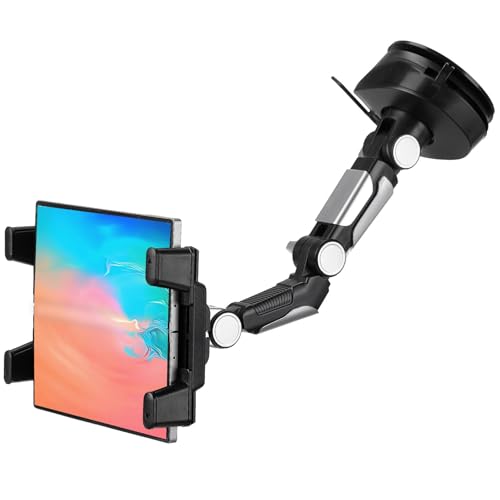
The JOYTUTUS 5-in-1 is the dashboard and windshield option in this lineup — aimed at front-seat use for navigation, rideshare work, and daily commuters who want a flexible mount rather than a fixed backseat unit. The suction cup attaches to either the dashboard or windshield surface, and the 5-in-1 designation refers to the combination of mounting positions, telescopic arm lengths, and swivel configurations that the system supports. An extendable arm adjusts both the reach and the height, which is genuinely useful for SUV and truck drivers whose dashboard surfaces sit further from eye level than a typical sedan.
The suction cup mechanism deserves specific attention. JOYTUTUS uses a heat-resistant, anti-slip gel layer in addition to the vacuum suction, which makes it substantially more reliable on warmer days when standard suction cups tend to release. The gel can be rinsed and air-dried to restore adhesion when it weakens over time — a reusable system that avoids the disposable adhesive pads that other mounts rely on. The 360-degree ball joint swivel handles orientation changes smoothly, and the device range of 4.7 to 12.9 inches covers everything from a standard iPhone to a full-size iPad Pro.
The mount also explicitly accommodates foldable phones — including the Samsung Galaxy Z Fold series — which is a 2026-relevant design touch as foldables become more mainstream. For Uber and Lyft drivers or anyone who uses GPS navigation heavily, the JOYTUTUS offers more flexibility than a headrest mount while staying genuinely stable. It is not the right tool for keeping kids entertained in the back row, but as a front-seat driver's companion, it covers a lot of ground.
Pros:
Cons:
The TFY headrest mount takes a fundamentally different approach to device holding compared to every other option in this guide: instead of rigid plastic or metal arms, it uses a silicone net (think of a stretched bungee-style holder) that cradles the device from the sides. The net is stretchable, completely non-scratch, and accommodates both phones (4.5 to 6 inches) and tablets (7 to 10.5 inches) in a single mount without any swapping of parts. That dual compatibility in one unit is genuinely useful for households where a kid might use a tablet for most of the trip but switch to a phone toward the end.
The silicone approach has practical advantages beyond scratch prevention. It naturally allows full access to all buttons, ports, and the screen from any angle. There is no tight clamp to loosen and re-tighten when swapping devices. And because the net stretches rather than grips rigidly, it handles cases, pop-sockets, and accessories on devices without complaint. Device compatibility in 2026 includes iPhone 17 Pro Max, Samsung Galaxy S24, iPad Pro 9.7-inch, iPad Mini 6, and Galaxy Tab — a wide cross-section of current hardware.
The trade-off is that a silicone net, while clever, does not provide the same rock-solid stability as a four-point clamp arm on heavy-duty roads. Over serious bumps, a heavier tablet (such as a full-size iPad) can flex against the net more than a clamped holder would allow. For smooth highway driving and standard road conditions, the TFY performs well and the entry price makes it an accessible starting point. For the most demanding off-road or rough-road use, a clamped design is more appropriate. This is a solid everyday mount — simple, safe, and sensibly priced for 2026.
Pros:
Cons:
With seven distinct designs reviewed above, the decision comes down to a handful of practical factors. Here is what to think through before purchasing.
This is the first and most important question. Headrest mounts (like the Macally, LISEN, AboveTEK, najiaxiaowu, and TFY) are designed for backseat passengers — typically children on road trips. They clip onto the vertical posts of the front seat's headrest and hold the screen at eye level for someone sitting directly behind. Dashboard and windshield mounts (the iBOLT and JOYTUTUS) are oriented toward the front seat, serving as navigation aids or hands-free viewing for drivers and front passengers.
Mixing up these categories is the most common purchasing mistake. A suction cup dashboard mount does nothing for backseat passengers, and a headrest arm is not useful for GPS navigation from the front. Identify the passenger and location first, then narrow the options accordingly.
Not all mounts fit all devices. The najiaxiaowu covers the widest range (5.5–18.4 inches), while the TFY tops out at 10.5 inches. The AboveTEK handles 4–11 inches and the iBOLT covers 7–10 inches. Before purchasing, measure the tablet diagonally and check whether the mount's range comfortably includes it — not just barely fits. Also consider cases: bulkier cases add width and thickness that can push some mounts to their limits. The iBOLT and TFY both explicitly accommodate popular protective cases, which is worth noting for users who keep their tablets cased at all times.
Foldable phones are a newer compatibility question. The JOYTUTUS is specifically engineered for devices like the Samsung Galaxy Z Fold series. Standard mounts with rigid clamp arms often struggle with foldable devices in their unfolded state due to the irregular thickness and hinge placement.
A mount that feels solid in a parking lot can rattle and sag on a rural highway. The key stability factors are the clamping mechanism, the arm joint rigidity, and how the mount connects to the headrest or dashboard. Mounts with stabilizer arms (like the Macally) or multiple locking axis joints (like the LISEN's 4-axis design) handle road vibration better than single-pivot designs. Suction cups are generally rated for smooth surfaces — textured dashboards may require the adhesive gel pad adapter that many manufacturers include in the box.
For anyone frequently driving on rougher surfaces — gravel, construction zones, rural roads — a clamped four-point holder or a locked aluminum mount (AboveTEK) will outperform silicone net or spring-tension designs over time. For smooth highway commuting, the difference is minimal and simpler designs work perfectly well.
Some buyers need a mount that stays in place for months (commercial vehicles, family cars where kids always ride in the same seat). Others need something that installs and uninstalls in under a minute for shared or rental vehicles. Clip-based headrest mounts like the Macally and TFY install and remove without tools in about two minutes — ideal for flexibility. The AboveTEK's locking system is designed for semi-permanent installation where security matters more than quick removal. The iBOLT with its B-size ball joint system is modular and designed to be repositioned across vehicle types without re-purchasing the cradle.
For truck owners who also invest in vehicle organization gear — similar to the thought process behind selecting from our guide to the best truck tool boxes — the iBOLT's commercial-grade design and B-size compatibility with aftermarket arms make it the most adaptable long-term choice in this category.
Most headrest mounts are designed to work with the vast majority of passenger vehicles, but fitment depends on the headrest post spacing and rod diameter. The Macally, for example, fits posts spaced 2 to 9 inches apart — which covers most modern sedans and SUVs. The najiaxiaowu requires posts 5 to 5.7 inches apart with a diameter of approximately 0.55 inches. Buyers should measure their headrest posts before purchasing any clip-based mount, especially if the vehicle is older, a luxury model, or has unconventional seat designs. Vehicles with non-removable headrests may not be compatible at all.
Headrest mounts for backseat use are positioned behind the front seats and do not obstruct the driver's forward or rear sightlines in normal seating configurations. Dashboard and windshield mounts, however, must be placed carefully to avoid blocking critical sightlines. Many states and countries have regulations about objects mounted to windshields. Drivers using dashboard or windshield mounts should position them low on the windshield or in a corner of the dashboard where they do not interfere with visibility. Always check local regulations before permanently mounting any device to a windshield.
Suction cup mounts attach to flat surfaces like dashboards and windshields using vacuum pressure, and are primarily designed for front-seat use — navigation, GPS apps, rideshare work. Headrest mounts clamp onto the vertical posts of the front seat headrest and position the screen for passengers in the back seat. The choice depends entirely on who is using the tablet and from which seat. Families entertaining kids on road trips need headrest mounts; daily drivers using a tablet for navigation need suction cup or dashboard mounts. Many buyers find they eventually need one of each type.
Case compatibility varies by mount design. Clamp-style mounts (like the Macally and AboveTEK) grip the edges of the device and can accommodate standard slim cases without issue, though very thick protective cases may push the arm to its maximum extension. Silicone net designs (like the TFY) are the most case-agnostic — the net simply stretches further to accommodate the added bulk. Pop-socket style accessories on the back of a device can interfere with clamp-style mounts but generally do not affect net-style holders. The iBOLT explicitly lists Otterbox and LifeProof compatibility, which is useful for buyers using heavy-duty cases.
Some mounts are versatile enough for use beyond the car. The iBOLT TabDock BizMount is specifically marketed for aviation use, and its B-size ball joint base can be adapted for aircraft cockpit mounts with the right adapter. Suction cup mounts work on airplane tray tables (smooth plastic surface) in some configurations. Headrest mounts designed for car posts generally cannot be adapted for airplane seats, which use fabric rather than metal rods. The LISEN 3-in-1's "stroller and carseat combo" description suggests it can double as a stroller mount — a useful feature for parents navigating airports with young children.
A properly installed tablet mount addresses distraction in two ways. For backseat passengers — especially children — holding a device for hours causes fatigue, leading to complaints and requests for help from the driver. A mount eliminates that problem, keeping kids engaged and the driver focused on the road. For front-seat navigation use, a mount positions the screen in a consistent, glanceable location rather than requiring the driver to look down at a device propped on a seat or cupholder. The key is correct positioning: the screen should be visible without significant head movement. Studies referenced by the NHTSA consistently link properly mounted devices to reduced distraction compared to hand-held alternatives.
The right tablet holder is the one that keeps the screen where it belongs — stable, safe, and out of the driver's hands.
 |
 |
 |
 |

About Joshua Thomas
Joshua Thomas holds a Bachelor of Science in Mechanical Engineering from San Diego State University and has spent years applying that technical foundation to hands-on automotive work — from routine maintenance to full mechanical repairs. He founded CarCareTotal in 2017 to give car owners the kind of clear, practical guidance that helps them understand what is happening under the hood and make smarter decisions about upkeep and repairs. At CarCareTotal, he oversees editorial direction and covers automotive fundamentals, maintenance guides, and troubleshooting resources for everyday drivers.
Get some FREE car parts & gear.. Or check out the latest free automotive manuals and build guides here.
Disable your ad blocker to unlock all the hidden deals. Hit the button below 🚗
| | | |
